In this article
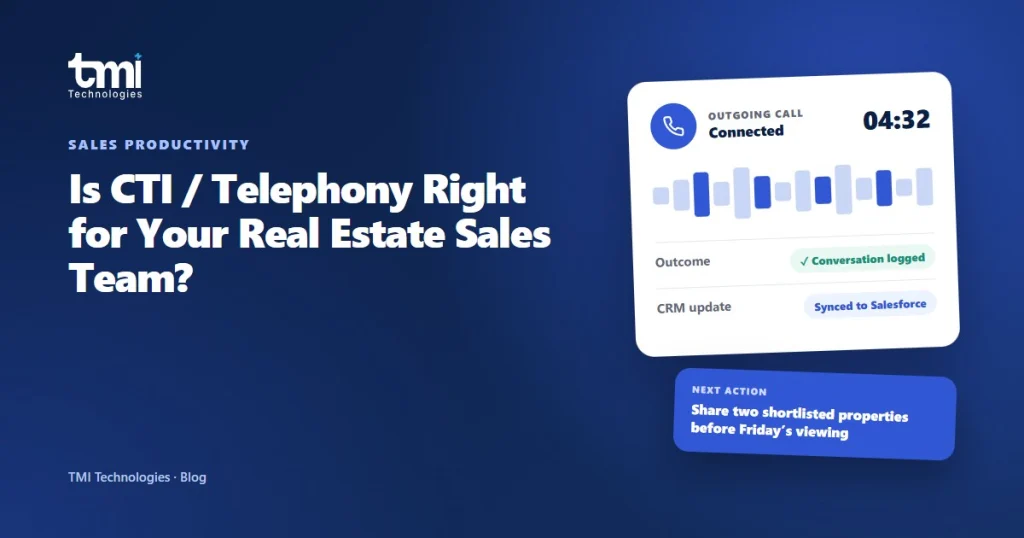
A company generates a real estate enquiry, assigns it to an agent, and expects a timely conversation.
Management’s question is reasonable: has someone actually spoken to the customer?
With significant investment going into lead generation, an untouched enquiry represents a missed opportunity. A lead marked “contacted” should give management confidence that meaningful action has taken place.
Yet the CRM update does not always tell the full story.
Why a lead update may not reflect a conversation
An agent may update a lead without reaching the customer. In some teams, pressure to demonstrate activity—or concern that an untouched lead will be reassigned—can encourage updates that overstate what happened.
This can be particularly challenging for newer agents who are still building confidence in customer conversations.
There is also a more ordinary explanation: updating the CRM takes effort.
After a call, the agent may need to open the CRM, find the customer, navigate several screens, enter notes, change the status, and create a follow-up task. Meanwhile, another customer is calling or a viewing is about to begin.
The update gets postponed. Later, details are forgotten or the update is missed entirely. Management loses visibility, even when the agent has done the work.
The solution needs to address both reliable activity capture and the practical effort of keeping records current.
Where CTI adds value
Computer Telephony Integration connects calling with the CRM. Depending on the solution and configuration, it can support:
- Click-to-call and automatic call logging.
- Call timestamps, duration, and connection outcomes.
- Call recordings and transcripts.
- Follow-up tasks and workflow automation.
- Reporting to support supervision and coaching.
For a dedicated telecalling or qualification team, these capabilities can be valuable. Agents work through queues, follow structured qualification processes, and hand suitable enquiries to sales. An integrated calling environment can support that operating model well.
The workflow changes when the relationship moves to sales
A qualified prospect’s relationship with a property consultant often extends across many short interactions.
A call leads to a WhatsApp conversation. The customer asks for a brochure, shares a location, confirms a meeting, requests driving directions, or calls back after visiting a property.
The consultant may be working from a project site, travelling between viewings, or meeting another customer.
At this stage, evaluate the complete communication journey:
- Can customers easily recognise and call back their consultant?
- Do calling and WhatsApp provide a consistent identity and clear continuity?
- Can the agent work comfortably away from a desktop?
- Does call connection introduce noticeable waiting or awkward silence?
- Can the agent quickly record the outcome and next action?
When the calling number and WhatsApp identity are disconnected, customers may need to navigate separate contact points for the same relationship.
Some telephony solutions can address these requirements. Others may introduce friction that becomes more apparent during ongoing sales conversations. Connection and audio quality depend on the implementation and network; delays are not a feature of every CTI solution.
The evaluation should include a real viewing-and-follow-up scenario, alongside the initial outbound call.
A mobile sales app can address a different part of the problem
For field agents, a customised mobile sales app can bring customer context, communication actions, and CRM updates into one convenient workspace.
The agent should be able to capture a short note, update the relevant stage, open WhatsApp or SMS, and schedule the next action with minimal navigation. Calling and messaging can use the agent’s approved business mobile identity where the setup supports it.
Where supported by the device, permissions, and deployment model, call activity and duration can also be associated with the CRM record. These capabilities should be validated on the devices the team actually uses.
This approach does not automatically provide cellular call recording or transcription. Its value lies in reducing the gap between the customer interaction and the CRM update.
A tap on “Call” should remain distinguishable from a connected call. Neither a call attempt nor duration alone proves that a meaningful sales conversation occurred.
Making CRM practical for a real estate developer’s sales team
A real estate developer faced familiar adoption challenges: calls left little time for CRM updates, multiple screens slowed agents down, opportunity information became stale, and follow-up commitments were difficult to recall.
The solution was a customised mobile sales app connected to Salesforce, bringing together:
- Click-to-call, WhatsApp, and SMS actions.
- Quick lead updates after customer calls.
- Capture of next actions and follow-up commitments.
- Salesforce authentication and access controls.
Results reported by the client for this implementation. Outcomes depend on the organisation’s processes, implementation, and adoption. This case study illustrates mobile workflow improvement; it is not a comparison trial against CTI.
Choose the approach around the team’s work
A real estate business may benefit from using different approaches at different stages.
| Team or requirement | Approach to evaluate |
|---|---|
| Structured telecalling and initial qualification | CTI with CRM integration |
| Recording, transcription, and call-quality reviews | A telephony solution supporting those requirements |
| Field sales, viewings, and frequent customer follow-up | A focused mobile sales experience |
| Qualification team handing leads to field agents | CTI and mobile workflows connected through CRM |
Management needs reliable visibility. Agents need a convenient way to work. Customers need a smooth, recognisable conversation.
Evaluate the solution against all three—and measure response time, useful conversations, follow-up completion, viewings, and conversion alongside call activity.
A practical customer journey
A qualified enquiry moves from the calling team to a field agent. The shared history shows the qualification outcome; the field agent continues the relationship through approved calling and messaging channels. A brief wrap-up captures the conversation and next follow-up.
How to turn the strategy into a system
- Map the work. Separate desk-based qualification from field selling and identify where recording, transcription, mobile access, and channel continuity matter.
- Validate activity capture. Confirm supported devices, permissions, call-event definitions, and integration behaviour. Distinguish a dial action, a connected call, and a meaningful outcome.
- Configure Salesforce. Link activities to the right customer, provide a short wrap-up screen, and create the next task with clear ownership.
- Pilot and measure. Review response time, update completion, overdue follow-ups, adoption, and customer experience before wider rollout.
Frequently asked questions
Is CTI suitable for every real estate agent?
Fit depends on the job. Structured telecalling may benefit from integrated queues and recordings; field sales also needs practical mobile access and customer continuity.
Does CTI always introduce call delays?
No. Connection and audio quality depend on implementation, network, and provider configuration. Test the actual calling journey.
Can a mobile app capture call duration?
In supported setups, it can associate call activity and duration with CRM records. Device restrictions, permissions, distribution policies, and integration design must be validated.
Does call duration prove that a lead was qualified?
No. It is an activity signal. Qualification needs an outcome, relevant customer context, and a clear next action.
Can a mobile app replace recording and transcription?
Not automatically. Those requirements need an appropriately supported telephony or communication solution.
Can CTI and a mobile sales app work together?
Yes. Teams can use different communication tools while connecting authorised history, ownership, outcomes, and tasks through Salesforce.
Technical references: Twilio voice quality and call metadata · Google Play call-log permission policy.